Advanced: Enabling and Disabling Tasks#
This section demonstrates how Xmera tasks can be enabled or disabled during runtime. Why is this useful? You might set up one group of modules to perform sun-pointing behavior, and another group for a science-pointing mode. By enabling or disabling tasks dynamically, you can define all tasks at the start of the simulation and selectively control which flight software modules are actively executed.
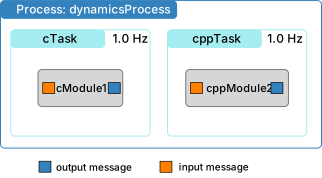
The sample script sets up a single process containing two tasks, named task1 and task2. Modules are assigned to
each of these tasks.
 1
 2    #  create the simulation process
 3    dynProcess = scSim.CreateNewProcess("dynamicsProcess")
 4
 5    # create the dynamics task and specify the integration update time
 6    dynProcess.addTask(scSim.CreateNewTask("task1", macros.sec2nano(1.)))
 7    dynProcess.addTask(scSim.CreateNewTask("task2", macros.sec2nano(1.)))
 8
 9    # create modules
10    mod2 = cppModuleTemplate.CppModuleTemplate()
11    mod2.modelTag = "module2"
12    scSim.AddModelToTask("task2", mod2)
13
14    #  initialize Simulation:
15    scSim.InitializeSimulation()
16
17    # execute BSK for a single step
18    scSim.TotalSim.singleStepProcesses()
19
20    dynProcess.disableTasks()
21    print("all tasks disabled")
22    scSim.TotalSim.singleStepProcesses()
23    print("BSK executed a single simulation step")
24
25    scSim.enableTask("task2")
26    scSim.TotalSim.singleStepProcesses()
27    print("BSK executed a single simulation step")
28
29    scSim.disableTask("task2")
30    scSim.TotalSim.singleStepProcesses()
31    print("BSK executed a single simulation step")
32
33    return
34
35
36if __name__ == "__main__":
37    run()
After the typical module initialization, the script executes a single simulation step. The terminal output confirms that both tasks are enabled, as both sets of modules are executed.
To disable all tasks within a process, use the disableTasks() method on the process variable. The script executes
another simulation step and prints output before and after to confirm that no tasks are running when they are disabled.
To re-enable a specific task, use the SimulationBaseClass method enableTask(name). The argument is the name of
the task you wish to enable. After another simulation step, the output confirms that the enabled task’s modules are once
again executed.
Similarly, to disable a specific task, use the method disableTask(name). The name of the task must be passed as a
string.
The expected output from executing the script looks as follows:
(.venv) source/code-samples % python xmera-8.py
BSK_INFORMATION: Variable dummy set to 0.000000 in reset.
BSK_INFORMATION: Variable dummy set to 0.000000 in reset.
BSK_INFORMATION: Module ID 1 ran Update at 0.000000s
BSK_INFORMATION: Module ID 2 ran Update at 0.000000s
all tasks disabled
BSK executed a single simulation step
BSK_INFORMATION: Module ID 1 ran Update at 2.000000s
BSK executed a single simulation step
BSK_INFORMATION: Module ID 1 ran Update at 3.000000s
BSK_INFORMATION: Module ID 2 ran Update at 3.000000s
BSK executed a single simulation step
BSK_INFORMATION: Module ID 1 ran Update at 4.000000s
BSK executed a single simulation step