Adding Xmera Modules#
Now that we understand what Xmera processes (task groups) and tasks are, we can move forward and add modules to a task. The cppModuleTemplate example provides a basic module, that will be used in this discussion. These modules demonstrate how to create a prototypical Xmera module.
The modules behave identically and are useful here because they print their module ID when executed. This makes it easy to observe the module execution order in the simulation.
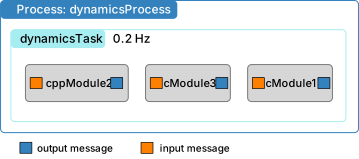
Simulation Structure#
The following simulation creates a single process called dynamicsProcess and a single 0.2 Hz task called
dynamicsTask. As shown above, three instances of cppModuleTemplate are
created, named mod1, mod2, and mod3 respectively. Note that in this simulation we want
modules 2 and 3 to run first, and module 1 to run last.
 1
 2    #  create the simulation process
 3    dynProcess = scSim.CreateNewProcess("dynamicsProcess")
 4
 5    # create the dynamics task and specify the integration update time
 6    dynProcess.addTask(scSim.CreateNewTask("dynamicsTask", macros.sec2nano(5.)))
 7
 8    # create copies of the xmera modules
 9    mod1 = cppModuleTemplate.CppModuleTemplate()
10    mod1.modelTag = "module1"
11
12    mod2 = cppModuleTemplate.CppModuleTemplate()
13    mod2.modelTag = "module2"
14
15    mod3 = cppModuleTemplate.CppModuleTemplate()
16    mod3.modelTag = "module3"
17
18    scSim.AddModelToTask("dynamicsTask", mod1)
19    scSim.AddModelToTask("dynamicsTask", mod2, 10)
20    scSim.AddModelToTask("dynamicsTask", mod3, 5)
21
22    #  initialize Simulation:
23    scSim.InitializeSimulation()
24    print("InitializeSimulation() completed...")
25
26    #   configure a simulation stop time and execute the simulation run
27    scSim.ConfigureStopTime(macros.sec2nano(5.0))
28    scSim.ExecuteSimulation()
29
30    return
31
32
33if __name__ == "__main__":
34    run()
Adding Modules to a Task#
To add a module to the simulation, create an instance and give it a unique name using the modelTag property:
module = someModule.someModule()
module.modelTag = "someModuleName"
For C-modules, the class name and instance name are the same. For C++ modules, the first name is the instance, and the second is the class name (which starts with a capital letter). See the example script for both styles.
Next, add the module to a task using:
scSim.AddModelToTask("taskName", module, priority)
The first argument is the task name.
The second is the module instance.
The third is an optional priority (integer).
Warning
If the priority is not provided, it defaults to -1. This means the module will execute after any modules
with assigned priorities, and in the order in which it was added. This behavior is consistent with how processes
and tasks are handled.
Module Imports#
In the example Python script:
The module cppModuleTemplate is imported from
Xmera.simulation.
Note
Xmera assigns unique positive ID numbers to modules upon their creation. In the example simulation, the three modules receive IDs 1, 2, and 3, corresponding to the order of creation.
Execution Priorities#
In the script:
Module1is added without a priority, so it defaults to -1.Module2andModule3are given priorities 10 and 5, respectively.
Modules with higher priority values are executed first. This allows for deterministic execution ordering.
Note
A task list can contain C++ and Python-based Xmera modules simultaneously. Python modules are discussed
in pyModules.
Expected Output#
When you run the script, you should see terminal output similar to:
source/code-samples % python3 xmera-2.py
BSK_INFORMATION: Variable dummy set to 0.000000 in reset.
BSK_INFORMATION: Variable dummy set to 0.000000 in reset.
BSK_INFORMATION: Variable dummy set to 0.000000 in reset.
InitializeSimulation() completed...
BSK_INFORMATION: C++ Module ID 2 ran Update at 0.000000s
BSK_INFORMATION: C++ Module ID 3 ran Update at 0.000000s
BSK_INFORMATION: C++ Module ID 1 ran Update at 0.000000s
BSK_INFORMATION: C++ Module ID 2 ran Update at 5.000000s
BSK_INFORMATION: C++ Module ID 3 ran Update at 5.000000s
BSK_INFORMATION: C++ Module ID 1_Update at 5.000000s
The reset() method from cppModuleTemplate prints a statement when a variable
is initialized. Since three modules are created, this reset message appears three times—once for each module.
Once scSim.InitializeSimulation() is called, Xmera begins executing the simulation. The Update() method
for each module is called in the order determined by their priorities, and the simulation time is printed each time
the module executes. As shown, the desired execution order is achieved based on the set priorities.