scenarioAttitudeFeedbackRWPower#
Overview#
Illustrates how to add a ReactionWheelPower to the simulation to track the RW power usages. Further, a the RW power modules are connected to a battery to illustrate the energy usage during this maneuver. This script expands on scenarioAttitudeFeedbackRW.
The script is found in the folder xmera/examples and executed by using:
python3 scenarioAttitudeFeedbackRWPower.py
The simulation layout is shown in the following illustration. A single simulation process is created
which contains both the spacecraft simulation modules, as well as the Flight Software (FSW) algorithm
modules. The 3 separate ReactionWheelPower instances are created to model the RW power requirements.
For more examples on using the RW power module see test_unitReactionWheelPower.
Next, a battery module is created
using simpleBattery. All the RW power draw messages are connected to the battery to model the total
energy usage.
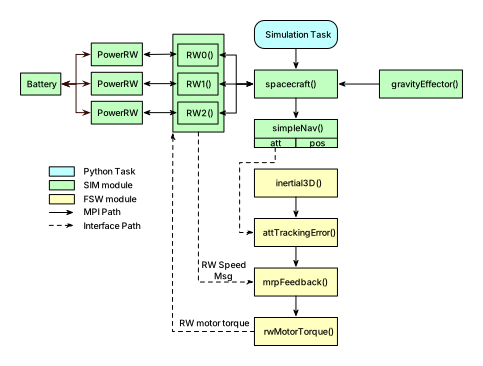
Illustration of Simulation Results#
The first simulation scenario is run with useRwPowerGeneration = False to model RW devices which require
electrical power to accelerate and decelerate the fly wheels. The attitude history should be the same
as in scenarioAttitudeFeedbackRW. Shown below are the resulting RW power requirements, as well as the
time history of the battery state.
show_plots = True, useRwPowerGeneration = False


The next simulation allows 50% of the breaking power to be returned to the power system. You can see how this will reduce the overall maneuver energy requirements.
show_plots = True, useRwPowerGeneration = True

